

The TNC7 from HEIDENHAIN at AMB 2024
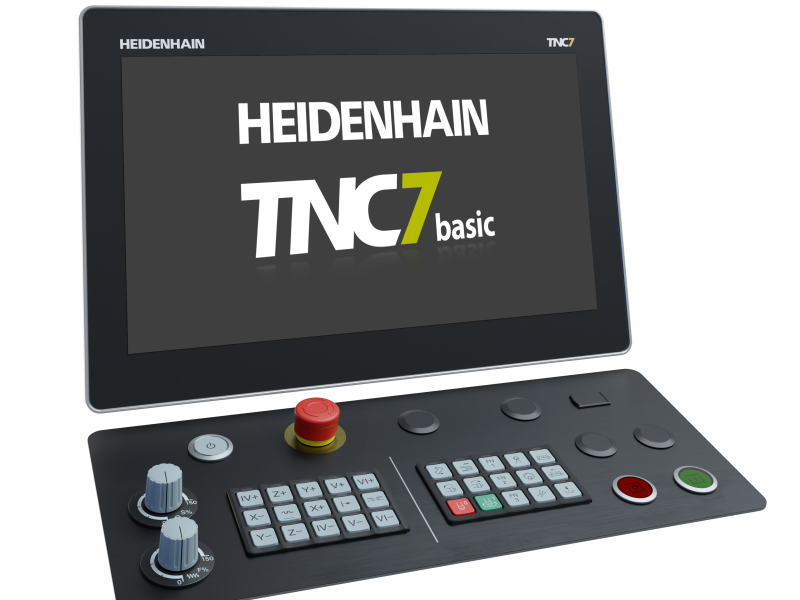
The expanded HMI portfolio with the compact TNC7 basic and the new OC 310 multi-functional o
“Stairway to sustainability: more productivity from the first part” is the HEIDENHAIN motto at its AMB trade show exhibit, where visitors will find a variety of solutions that unlock greater productivity, quality and process reliability. Concerning numerical controls, this includes the compact TNC7 basic for 3+2-axis machines and the new OC 310 multi-functional override controller.
At the HEIDENHAIN booth and at the TNC Club booth, visitors to AMB will find numerous possibilities to inform themselves about the expanded offerings related to the family of TNC7 controls. In addition to the familiar 24-inch version, there are also a 19-inch TNC7 with a smaller touchscreen but otherwise with all the same functions, the new TNC7 basic with 16-inch touchscreen for compact machine tools, and TNC7 programming stations for taking part in the unique experience of using functions like MAS graphical 6D setup, DCM collision monitoring and the OCM trochoidal milling cycles.
Multi-faceted hardware portfolio with the compact TNC7 basic
Thanks to its new hardware versions, spanning three different monitors (24-inch, 19-inch and 16-inch) and different keyboards, the intuitive TNC7 from HEIDENHAIN can be adapted to a wider range of applications. At the AMB 2024 trade show, HEIDENHAIN is focusing on the 16-inch version, called the TNC7 basic. As successor to the TNC 620, this new version lies toward the lower end of the TNC7 portfolio, delivering powerful TNC7 benefits to compact machines, such as those with 3+2 axes. Its typical TNC7 highlights include a monitor with Full HD resolution and access to an extensive suite of software options, such as MAS graphical 6D setup support, DCM collision monitoring and OCM trochoidal milling, all of which contribute to the control’s next-generation user-friendliness, efficiency and process reliability.
New: the OC 310 multi-functional override controller for the TNC7
Two potentiometers in one multi-functional control knob: the new OC 310 override controller facilitates working with a TNC7, since the user can now regulate both the feed rate and rapid traverse with just one operating element. The user is assisted by the new “Conditional stop” software function, for intuitive, convenient and one-handed proving-out of NC programs. The user simply defines breakpoints in the NC program at which the control will stop during program run, such as before a tilting function, when the tool is changed, or when the machining feed rate changes to rapid traverse. The override controller vibrates to generate tactile feedback, simplifying the user's workday.
Start machining sooner
The quest for high first-part productivity across all batch sizes and levels of automation requires looking beyond merely the machining phase. It is particularly important that the machine setup process be fast and convenient, thus saving time and reducing your carbon footprint. With its graphically supported 6D workholding and workpiece setup functions, the TNC7 offers two significant ways of saving both time and energy.
This virtual support enables fast, user-friendly and reliable position probing for both fixtures and blanks, regardless of the setup’s complexity. No matter whether it is a simple part, or a complex and pre-worked part, or if a clamping tower is being used, the TNC7 provides interactive step-by-step assistance throughout the setup process. For complex parts, this setup method can be up to five times faster than conventional probing cycles. When applied to workholding, this 6D position probing feature is part of the enhanced dynamic collision monitoring function (DCM). When applied to workpieces, the new Model Aided Setup (MAS) option comes into play.
Mill with the optimal cutting data
The package of options available for the TNC7 includes Optimized Contour Milling (OCM), which delivers next-generation trochoidal milling by automatically calculating the best trochoidal milling strategy at all times for pockets and islands of any shape. Users simply enter the contours and apply the optimal machining parameters from the built-in cutting data calculator. As a result, roughing and milling become highly productive and impose less wear on tools. OCM’s intelligent deburring functions then produce perfect edges along the programmed contour. Optimized Contour Milling reduces energy consumption, raises process reliability and saves time throughout the production process, from programming to machining.
The expanded HMI portfolio with the compact TNC7 basic and the new OC 310 multi-functional o
“Stairway to sustainability: more productivity from the first part” is the HEIDENHAIN motto at its AMB trade show exhibit, where visitors will find a variety of solutions that unlock greater productivity, quality and process reliability. Concerning numerical controls, this includes the compact TNC7 basic for 3+2-axis machines and the new OC 310 multi-functional override controller.
At the HEIDENHAIN booth and at the TNC Club booth, visitors to AMB will find numerous possibilities to inform themselves about the expanded offerings related to the family of TNC7 controls. In addition to the familiar 24-inch version, there are also a 19-inch TNC7 with a smaller touchscreen but otherwise with all the same functions, the new TNC7 basic with 16-inch touchscreen for compact machine tools, and TNC7 programming stations for taking part in the unique experience of using functions like MAS graphical 6D setup, DCM collision monitoring and the OCM trochoidal milling cycles.
Multi-faceted hardware portfolio with the compact TNC7 basic
Thanks to its new hardware versions, spanning three different monitors (24-inch, 19-inch and 16-inch) and different keyboards, the intuitive TNC7 from HEIDENHAIN can be adapted to a wider range of applications. At the AMB 2024 trade show, HEIDENHAIN is focusing on the 16-inch version, called the TNC7 basic. As successor to the TNC 620, this new version lies toward the lower end of the TNC7 portfolio, delivering powerful TNC7 benefits to compact machines, such as those with 3+2 axes. Its typical TNC7 highlights include a monitor with Full HD resolution and access to an extensive suite of software options, such as MAS graphical 6D setup support, DCM collision monitoring and OCM trochoidal milling, all of which contribute to the control’s next-generation user-friendliness, efficiency and process reliability.
New: the OC 310 multi-functional override controller for the TNC7
Two potentiometers in one multi-functional control knob: the new OC 310 override controller facilitates working with a TNC7, since the user can now regulate both the feed rate and rapid traverse with just one operating element. The user is assisted by the new “Conditional stop” software function, for intuitive, convenient and one-handed proving-out of NC programs. The user simply defines breakpoints in the NC program at which the control will stop during program run, such as before a tilting function, when the tool is changed, or when the machining feed rate changes to rapid traverse. The override controller vibrates to generate tactile feedback, simplifying the user's workday.
Start machining sooner
The quest for high first-part productivity across all batch sizes and levels of automation requires looking beyond merely the machining phase. It is particularly important that the machine setup process be fast and convenient, thus saving time and reducing your carbon footprint. With its graphically supported 6D workholding and workpiece setup functions, the TNC7 offers two significant ways of saving both time and energy.
This virtual support enables fast, user-friendly and reliable position probing for both fixtures and blanks, regardless of the setup’s complexity. No matter whether it is a simple part, or a complex and pre-worked part, or if a clamping tower is being used, the TNC7 provides interactive step-by-step assistance throughout the setup process. For complex parts, this setup method can be up to five times faster than conventional probing cycles. When applied to workholding, this 6D position probing feature is part of the enhanced dynamic collision monitoring function (DCM). When applied to workpieces, the new Model Aided Setup (MAS) option comes into play.
Mill with the optimal cutting data
The package of options available for the TNC7 includes Optimized Contour Milling (OCM), which delivers next-generation trochoidal milling by automatically calculating the best trochoidal milling strategy at all times for pockets and islands of any shape. Users simply enter the contours and apply the optimal machining parameters from the built-in cutting data calculator. As a result, roughing and milling become highly productive and impose less wear on tools. OCM’s intelligent deburring functions then produce perfect edges along the programmed contour. Optimized Contour Milling reduces energy consumption, raises process reliability and saves time throughout the production process, from programming to machining.