

Program free-form surfaces right at the machine
Pliening, February 2022: For some time now, HURCO machines have offered the "Solid Model Import" option for importing 3D models to create a STEP file. While this functionality reduces programming time and helps avoid programming errors, it also offers another salient asset by simplifying processing of 5-sided workpieces. With the debut of this new function in the HURCO control software, it is now also possible to program 3D free-form surfaces right at the machine thanks to our Solid Model Import feature. For unrivaled versatility, currently available exclusively from HURCO. This is especially valuable for those contract manufacturers who are not able or ready to acquire dedicated CAD/CAM systems of their own. Up to now, CAD models had to be translated into processing programs by external service providers, or the contracts had to be rejected, both of which entailed serious competitive disadvantages in a world of increasingly complex machined parts. "Now, at least for our own customers, there is a solution," emphasizes Sebastian Herr, Application Support Manager at HURCO Deutschland. "Formerly the Solid Model Import option could be used to scan in surfaces and workpiece edges, but now operators can specify 3D surface areas as free-form surfaces. This option relies exclusively on the Solid Model Import because the surface geometry is needed to calculate the milling trajectories."
Extensive program database
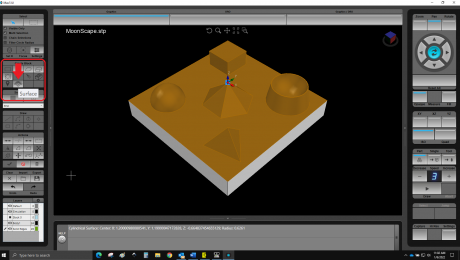
Either spherical or torus cutters are employed for the subsequent surface-milling process. This process is supported by the extensive array of cycle selections that HURCO offers in the programming database. It also contains all of the standard tools required for this machining process. The operator simply specifies the surface destined to be machined from the solid casting. Then the only remaining step is to define the tool being used. The program responds by calculating all of the required machining processes according to surface geometry. Throughout the procedure, the machine's touchscreen is used to program using the previously imported data. Here, the STEP file representing the various surfaces appears on the screen at the right. The surfaces can be individually selected for subsequent conversion into data sets for processing.
Enhanced speed and flexibility
In virtually all cases, the contractor supplies the CAD models to HURCO customers. At which it will almost always be 3D surface models that are being generated. This translates into a significant expansion of the potential customer base available to the contract manufacturer, who can now proceed directly to the machine with no intermediate steps. At which point firms can now consider practically any customer request by responding with direct on-site calculations to expedite contract closings. If a CAD/CAM work station happens to be available in the same firm, it, in turn, will now be available for use in processing other parts. In any case, the external service provider will be consigned to redundancy.
Convenient display, as easy to use as a smartphone
The entire range of HURCO machines is now available with the Solid Model Import option. In addition, a software upgrade is available to equip multiple earlier models with this capability. The popular Solid Model Import functionality is now found in no less than 80 percent of all new machines being sold by HURCO. So ensuring 3D capability was a logical move. Especially considering that the trend among our clients is clearly moving back to the machine: Which is where you perform much of your programming, exploiting this ability to save both time and expense while also freeing up the CAD/CAM system for use in programming the most complex 3D parts. For HURCO, this equates with consistent advanced development aimed at continuous improvement in machine terminals, all aimed at offering the operator a thoroughly reliable, highly functional, high-performance interface. The new "Multi-Touch" display embodies the benefits of this concept with such features as two-finger operation, of the kind used with smartphones. "This refinement reflects our approach to the latest generation of metal-cutting and machining equipment," is Herr's appraisal. "With just two fingers, you can zoom in and out, or twist and turn the part. This results in consistent reductions in processing times while also providing an exponential increase in user convenience."
Pliening, February 2022: For some time now, HURCO machines have offered the "Solid Model Import" option for importing 3D models to create a STEP file. While this functionality reduces programming time and helps avoid programming errors, it also offers another salient asset by simplifying processing of 5-sided workpieces. With the debut of this new function in the HURCO control software, it is now also possible to program 3D free-form surfaces right at the machine thanks to our Solid Model Import feature. For unrivaled versatility, currently available exclusively from HURCO. This is especially valuable for those contract manufacturers who are not able or ready to acquire dedicated CAD/CAM systems of their own. Up to now, CAD models had to be translated into processing programs by external service providers, or the contracts had to be rejected, both of which entailed serious competitive disadvantages in a world of increasingly complex machined parts. "Now, at least for our own customers, there is a solution," emphasizes Sebastian Herr, Application Support Manager at HURCO Deutschland. "Formerly the Solid Model Import option could be used to scan in surfaces and workpiece edges, but now operators can specify 3D surface areas as free-form surfaces. This option relies exclusively on the Solid Model Import because the surface geometry is needed to calculate the milling trajectories."
Extensive program database
Either spherical or torus cutters are employed for the subsequent surface-milling process. This process is supported by the extensive array of cycle selections that HURCO offers in the programming database. It also contains all of the standard tools required for this machining process. The operator simply specifies the surface destined to be machined from the solid casting. Then the only remaining step is to define the tool being used. The program responds by calculating all of the required machining processes according to surface geometry. Throughout the procedure, the machine's touchscreen is used to program using the previously imported data. Here, the STEP file representing the various surfaces appears on the screen at the right. The surfaces can be individually selected for subsequent conversion into data sets for processing.
Enhanced speed and flexibility
In virtually all cases, the contractor supplies the CAD models to HURCO customers. At which it will almost always be 3D surface models that are being generated. This translates into a significant expansion of the potential customer base available to the contract manufacturer, who can now proceed directly to the machine with no intermediate steps. At which point firms can now consider practically any customer request by responding with direct on-site calculations to expedite contract closings. If a CAD/CAM work station happens to be available in the same firm, it, in turn, will now be available for use in processing other parts. In any case, the external service provider will be consigned to redundancy.
Convenient display, as easy to use as a smartphone
The entire range of HURCO machines is now available with the Solid Model Import option. In addition, a software upgrade is available to equip multiple earlier models with this capability. The popular Solid Model Import functionality is now found in no less than 80 percent of all new machines being sold by HURCO. So ensuring 3D capability was a logical move. Especially considering that the trend among our clients is clearly moving back to the machine: Which is where you perform much of your programming, exploiting this ability to save both time and expense while also freeing up the CAD/CAM system for use in programming the most complex 3D parts. For HURCO, this equates with consistent advanced development aimed at continuous improvement in machine terminals, all aimed at offering the operator a thoroughly reliable, highly functional, high-performance interface. The new "Multi-Touch" display embodies the benefits of this concept with such features as two-finger operation, of the kind used with smartphones. "This refinement reflects our approach to the latest generation of metal-cutting and machining equipment," is Herr's appraisal. "With just two fingers, you can zoom in and out, or twist and turn the part. This results in consistent reductions in processing times while also providing an exponential increase in user convenience."