Mastercam
2693
Mastercam
2693
{{ moduleLabel }}
{{ label }}

Mastercam’s Design Tools

Provide Flexibility and Ease of Use

Tolland, CT – Mastercam is known for powerful NC programming, but it also delivers a suite of shop-tested design tools including 3D surfacing and solids.
The streamlined CAD engine makes design work easier than ever before.

Mastercam Design streamlines modeling and editing geometry. It also supports advanced geometry creation, including NURBS curves and surfaces, 2D and 3D associative dimensioning, surface extension, blending, trimming, splitting, variable filleting, solid modeling, hybrid modeling, and so much more!


A few new enhancements to Mastercam Design X7 are:

Modify Solid Feature
The new Modify Solid Feature function allows you to create bodies and/or remove features from solid models that do not have any operation history. To create or remove a body, select the face of any feature, including bosses and open pockets, on the solid model. Mastercam recreates the feature in a new, independent solid body and leaves the original solid unchanged, or eliminates the feature by modifying the original body.

Modify Solid Fillet
Use the new Modify Solid Fillet function to quickly change the radius of fillets in solid models that do not have any operation history. You can apply your changes to sets of tangential fillets or fillets with matching radii.

Solid Hole-Axis
The new Solid Hole-Axis function creates axis lines in circular holes in solid bodies, with or without history. Hole-axis lines are created using your current system attribute settings (line size, color, etc.). You can also create related geometry (points and circles) using the options in the dialog box.

Xform Project Improvements
New controls have been added to the Xform Project dialog specifically for projecting onto a surface. Particularly useful when working with small parts, Mastercam now prompts you to increase your default tolerance to attain the best results. In addition, you can choose between projecting blended splines or attempting to match the number of source geometry pieces to the number of projected entities.
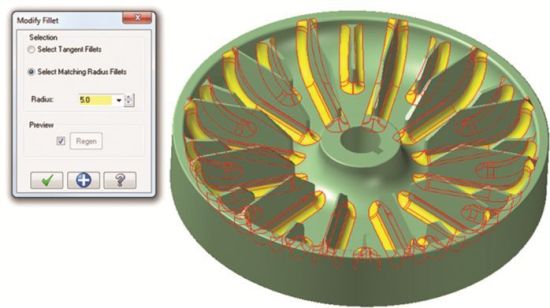
 

Mastercam's new Modify Fillet function lets you quickly change the radius
of fillets in solid models that do not have any operation history.


Responsible for the content of this press release: InterCAM-Deutschland GmbH
 

Responsible for the content of this press release: InterCAM-Deutschland GmbH

Login or register now and enjoy all the benefits of a community!

To get the whole functionality of IndustryArena Forum you need to login or register. This process is absolutely free.

Password forgotten?
Contact request
Guest Photo
The controller within the meaning of Art. 4(7) GDPR is: IndustryArena GmbH, Schneiderstr. 6, 40764 Langenfeld, Germany.
You may reach our data protection officer under [email protected].

Purpose of processing
We process your personal data concerning the use of the contact form and the communication with the company of the newsroom as well as the transmission of your data to this company in accordance to Art. 6 (1a) GDPR. This constitutes a legitimate interest for us in accordance to Art. 6 (1f) GDPR.

Recipient of the data
Within our organization, those units gain access to your data, which are necessary to fulfil the above purposes.
Personal data will only be transmitted to third parties if this is necessary for the aforementioned purposes or if another legal basis exists. If necessary, we conclude the corresponding data protection agreements with third parties, in particular pursuant to Art. 28 GDPR.

Data storing
Your data will be transmitted to the company of the newsroom for further processing. The period of storing is the duration of the processing of your request by the respective company.
InterCAM-Deutschland GmbH
{{ errors.first('subject') }}
{{ errors.first('comments') }}
Personal Information
{{ errors.first('company') }}
{{ errors.first('name_title') }}
{{ errors.first('phone_number') }}
{{ errors.first('email') }}
{{ errors.first('zip') }}
{{ errors.first('city') }}
The controller within the meaning of Art. 4(7) GDPR is: IndustryArena GmbH, Schneiderstr. 6, 40764 Langenfeld, Germany.
You may reach our data protection officer under [email protected].

Purpose of processing
We process your personal data concerning the use of the contact form and the communication with the company of the newsroom as well as the transmission of your data to this company in accordance to Art. 6 (1a) GDPR. This constitutes a legitimate interest for us in accordance to Art. 6 (1f) GDPR.

Recipient of the data
Within our organization, those units gain access to your data, which are necessary to fulfil the above purposes.
Personal data will only be transmitted to third parties if this is necessary for the aforementioned purposes or if another legal basis exists. If necessary, we conclude the corresponding data protection agreements with third parties, in particular pursuant to Art. 28 GDPR.

Data storing
Your data will be transmitted to the company of the newsroom for further processing. The period of storing is the duration of the processing of your request by the respective company.

Select contact person

Newsroom Logo

Design options

  • Title text color:
  • Content background:
  • Content text color:
  • Navigation background:
  • Tab text color:
  • Active tab text color:
  • Link text color:
  • Active link text color:
  • Background image Background color:

    How do you want to position the background-image?

    Please note: Banners and skyscrapers are only saved for the current language. For other languages, change the language using the button at the top right.

    Set the link for the background image

  • Banner

    How do you like to align the banner?

    Please note: Banners and skyscrapers are only saved for the current language. For other languages, change the language using the button at the top right.

    Set the link for the banner

  • Skyscraper

    Set the link for the skyscraper

Please note:

Banners and skyscrapers are only saved for the current language. For other languages, change the language using the button at the top right.