
Digital. Experienced. Powerful. - 100% Tool Management
TDM Global Line 2019: The tool data management system for Industry 4.0
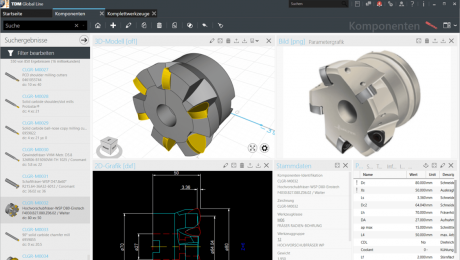
TDM Systems, the digitalization specialist for the chip-making industry, has significantly enhanced its tool data management system with the new release of TDM 2019/TDM Global Line 2019. The latest generation of TDM Global Line – the proven TDM Tool Management system developed on the basis of 25 years of experience – now offers practically all the functions of the TDM core solution. Moreover, it stands out on account of its centrally available database, which can be accessed from any business location worldwide.
"The global use of a central database results in massive IT cost savings, productivity increases and synergies that span multiple locations," explains Eugen Bollinger, Vice President Sales at TDM Systems GmbH. "In order to increase the added value for the user even further, we have expanded the configuration options in TDM Global Line 2019 and developed new modules."
- TDM Shopfloor Manager: This powerful tool allows for comprehensive workflow management, incorporating booking functions and a large number of interfaces for crib systems, presetting devices and machines as well as for higher-level systems such as MES, FMS and ERP. Users can now create multiple shopfloor configurations in order to depict workflows in various production areas. A new feature is individual status management, which allows an individual to define the tool status themselves within the workflow.
- TDM Production Document Management: With the new module, users can assign as many documents as they wish to the production resources via a drag-and-drop function – either in the form of a link to the actual saved location or as a copy on the Global Line server. This ensures that all relevant information is simply and securely documented.
- Graphics functions: New functions allow the use to generate rotation contours from 2D graphics using the Tool Contour Generator, with just a few mouse clicks and the aid of an intuitive user navigation system. In combination with the 3D Rotation Generator, simulation-ready 3D models for realistic collision checking in CAM systems can be generated within of a few seconds. Each of these features can be started via the 2D widget in the item and tool assembly area.
- WebCatalog: With the new release of TDM 2019 and TDM Global Line 2019, upon registering with TDM systems, users will have access to the latest tool catalogs in the cloud and can therefore obtain consistently up-to-date, verified tool data from leading manufacturers. Time-consuming searches and creation of individual tools and items, or even the need for a complete tool database, are now things of the past.
Users of TDM Global Line 2019 will be able to discover plenty of other innovative features alongside those already mentioned, such as the individually customizable user interface.
TDM 2019: The future is hybrid
The Tübingen-based tool data specialists have also invested a great deal of expertise and resources into the further development of the TDM core solution. This means that users of TDM 2019 can benefit from the new hybrid mode: They can use Global Line modules such as the Shopfloor Manager in combination with the TDM 2019 version. Access to the TDM WebCatalog is also possible for the current version. It provides everything that's needed for greater flexibility and efficiency on the shopfloor. Everyday work can also be facilitated via the expanded Multiple Plant Management system, which allows equipment to be assigned with even greater precision.
Numerous interfaces – e.g. for Siemens NX, CATIA V5, Vericut and DMG Virtual Machine – allow manufacturing systems to be optimally integrated with TDM 2019 and TDM Global Line 2019.
The new 2019 releases of TDM and TDM Global Line will be available from August 19 and will be presented at the EMO 2019 during September 16–21.
- TDM Systems booth: Hall 9, F24
- DMG MORI booth: Hall 2 at north entrance
- KELCH booth: Hall 4, B61
- Mastercam: Hall 9, A24
TDM Systems, the digitalization specialist for the chip-making industry, has significantly enhanced its tool data management system with the new release of TDM 2019/TDM Global Line 2019. The latest generation of TDM Global Line – the proven TDM Tool Management system developed on the basis of 25 years of experience – now offers practically all the functions of the TDM core solution. Moreover, it stands out on account of its centrally available database, which can be accessed from any business location worldwide.
"The global use of a central database results in massive IT cost savings, productivity increases and synergies that span multiple locations," explains Eugen Bollinger, Vice President Sales at TDM Systems GmbH. "In order to increase the added value for the user even further, we have expanded the configuration options in TDM Global Line 2019 and developed new modules."
- TDM Shopfloor Manager: This powerful tool allows for comprehensive workflow management, incorporating booking functions and a large number of interfaces for crib systems, presetting devices and machines as well as for higher-level systems such as MES, FMS and ERP. Users can now create multiple shopfloor configurations in order to depict workflows in various production areas. A new feature is individual status management, which allows an individual to define the tool status themselves within the workflow.
- TDM Production Document Management: With the new module, users can assign as many documents as they wish to the production resources via a drag-and-drop function – either in the form of a link to the actual saved location or as a copy on the Global Line server. This ensures that all relevant information is simply and securely documented.
- Graphics functions: New functions allow the use to generate rotation contours from 2D graphics using the Tool Contour Generator, with just a few mouse clicks and the aid of an intuitive user navigation system. In combination with the 3D Rotation Generator, simulation-ready 3D models for realistic collision checking in CAM systems can be generated within of a few seconds. Each of these features can be started via the 2D widget in the item and tool assembly area.
- WebCatalog: With the new release of TDM 2019 and TDM Global Line 2019, upon registering with TDM systems, users will have access to the latest tool catalogs in the cloud and can therefore obtain consistently up-to-date, verified tool data from leading manufacturers. Time-consuming searches and creation of individual tools and items, or even the need for a complete tool database, are now things of the past.
Users of TDM Global Line 2019 will be able to discover plenty of other innovative features alongside those already mentioned, such as the individually customizable user interface.
TDM 2019: The future is hybrid
The Tübingen-based tool data specialists have also invested a great deal of expertise and resources into the further development of the TDM core solution. This means that users of TDM 2019 can benefit from the new hybrid mode: They can use Global Line modules such as the Shopfloor Manager in combination with the TDM 2019 version. Access to the TDM WebCatalog is also possible for the current version. It provides everything that's needed for greater flexibility and efficiency on the shopfloor. Everyday work can also be facilitated via the expanded Multiple Plant Management system, which allows equipment to be assigned with even greater precision.
Numerous interfaces – e.g. for Siemens NX, CATIA V5, Vericut and DMG Virtual Machine – allow manufacturing systems to be optimally integrated with TDM 2019 and TDM Global Line 2019.
The new 2019 releases of TDM and TDM Global Line will be available from August 19 and will be presented at the EMO 2019 during September 16–21.
- TDM Systems booth: Hall 9, F24
- DMG MORI booth: Hall 2 at north entrance
- KELCH booth: Hall 4, B61
- Mastercam: Hall 9, A24