

Programming with 3 axes, milling with 5 axes
Today, 3-axis manufacturing methods and powerful software ensure excellent surface results in nearly all workpieces. In some cases, however, calculating the required tilt directions has proven to be very time-consuming – comprehensive manufacturing knowledge is indispensable. Sealing and visible surfaces must also be frequently machined without interruption, thus requiring five axes. The new 3to5-axis converter by Tebis offers a fast and reliable solution to meet these additional requirements: In the course of 3-axis NC programming, you can automatically generate collision-free 5-axis toolpaths.
The advantages of 3-axis NC programming are obvious: The tool moves more steadily, and the controller responds faster than in 5-axis machining. The programming is considerably simpler and remains manageable for programmers and machine operators alike. Potential collisions can be controlled more easily.
However, if you need to machine deep cavities and steep walls collision-free with shorter tools, 5-axis machining is probably the better choice. Furthermore, a dynamic orientation of the tool permits the generation of more homogeneous transitions than fixed tilt directions.
Using the 3to5-axis converter provided with the new Tebis Release 5, you can create your 3-axis milling programs as usual, and still enjoy the benefits of 5-axis simultaneous machining – without needing a license for the 5-axis simultaneous milling module. Your only prerequisite is a 5-axis-capable machine. The converter is the result of years of experience of the Tebis experts in 3-axis and 5-axis programming. Process reliability is ensured. Knowledge in 5-axis programming is not required.
Collision-free toolpaths
With Version 3.5, from release to release we consistently pursued our objective of developing new strategies for collision avoidance. Collisions are to be recognized and avoided already before the first calculation. In this context, the interactive determination of the tilt direction should be mentioned as an example. With this strategy, you use a new check function to manually position the tool on the part. Potential collisions are displayed graphically.
Consequentially, the 3to5-axis converter continues this concept. Using this new add-on module, you define different collision avoidance strategies when you use a ball cutter in finishing and residual stock operations. The system automatically calculates the necessary avoidance movements for all potential collisions with a tool component – always taking the specific machine kinematic into account. A 5-axis toolpath is generated without the need for the workpiece to be split into different milling areas.
Manual intervention by the user is possible but not mandatory.
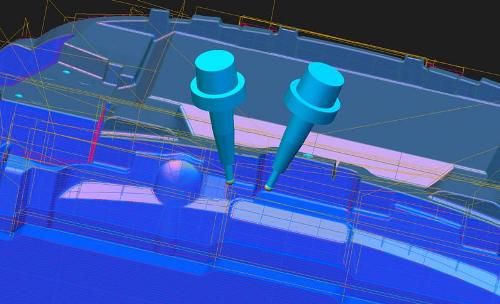
In order to reduce avoidance movements and to avoid jerky movements,
you can preselect a minimal tool tilt. The service life of the tool increases.
5-axis simultaneous machining of sculptured surfaces
Besides for purposes of collision avoidance, the 3to5-axis converter can be used productively in other areas. In certain part areas – such as sculptured surfaces, requiring a frequent change of tool orientation for the machining – the use of fixed tilt directions in the machining frequently causes a loss in surface quality due to adverse cutting conditions. In this case, dynamic 5-axis tool movements could be used to compensate for these conditions.
Ease of operation
When we develop our modules, we always keep the following in mind: On the one hand, standards should ensure maximum process reliability. On the other hand, flexibility to react to any specific requirement must be ensured. Thus, even the basic settings of our new add-on module achieve excellent results. At the same time, it is possible to individually adjust the programs. For this purpose, we intentionally used simple parameters that are easily understood, even without knowledge of 5-axis milling. This enables you, for example, to very easily program a classic rotary-table machining of the tool.
Integrated into manufacturing templates
The new add-on module can be easily integrated into your manufacturing templates. Corresponding to the geometries to be machined, you specify once the conditions for which the system is to generate 5-axis toolpaths. For example, the check may be useful in the Z-constant machining of surfaces. The corresponding templates can be reused at any time.
To prevent misconceptions: The new converter is, of course, not a full replacement for 5-axis programming. When highly complex undercut parts must be machined with five axes, you still need experienced 5-axis programmers and the corresponding module. But for the applications mentioned, such as the vertical machining of walls and deep cavities, but also sculptured surfaces in the visible areas, the converter is definitely the right alternative.
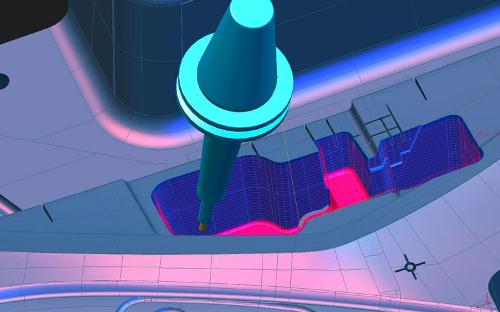
The machining of deep cavities also demonstrates the advantages
of the new function. Using shorter tools prevents unnecessary vibrations.
Responsible for the content of this press release: Tebis AG