

TRUMPF to showcase fastest dental 3D printer
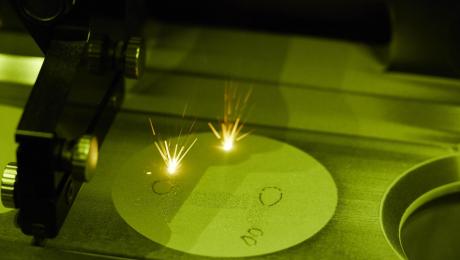

High-tech company TRUMPF is set to unveil the most productive 3D metal printer for dental prosthetics on the market at IDS, the world's leading dental technology trade show. The TruPrint 1000 is the only small-format system to work with multiple lasers. Its two laser beams manufacture dental products ten times faster than conventional dental milling machines. TRUMPF’s small-format 3D printer comes with another innovative feature – digital connectivity. With its wireless link to milling machines, the TruPrint 1000 is able to print teeth to be mounted on implants. An implant-supported denture replaces not only the visible tooth; it also provides the root to anchor it. This latest offering from TRUMPF is helping to industrialize dental 3D printing.
Just three minutes to print a tooth
A great deal of time and effort goes into constructing bridges, crowns and other dental prostheses by hand. The conventional method calls on a dental technician to make molds and cast the parts manually. The digital option is to build a 3D model on a computer to serve as the blueprint for a milling machine. “3D printing is a lot faster than both methods,” says Reinhard Sroka, who heads up the dental products unit at TRUMPF. Once the 3D model is finished, the system manufactures the parts on a platform, followed by a milling machine to put on the finishing touches. The TruPrint 1000's multi-laser capability enables this system to build at least 80 teeth on its platform in less than three hours. “That is around three minutes each, which makes 3D printing more than ten times faster than the conventional method,” says Sroka. He also points out that the quality of 3D printing is higher because the system is better at mapping dental structures.
A link to milling stations for ultra-precise 3D printing
TRUMPF experts upgraded the system’s IT interface to equip the TruPrint 1000 with a digital link to connect milling machines. “More and more dentures are being mass-manufactured, particularly in Asia, which is why it is crucial to support the digital workflow. The connection to the milling machine is a key milestone step towards automated mass production,” says Sroka. This innovate feature also enables the system to print implant-supported dental prostheses, a necessity when a patient has no residual tooth left to build on. The implant and dental prosthesis are bolted down, so the 3D printer must work with exacting precision to ensure a snug fit. The tooth may not hold if there is even the slightest deviance. The TruPrint’s upgraded IT interface enables it to print to such exacting specifications. The milling machine recognizes the platform holding the printed teeth and aligns its zero point accordingly. “Implant-supported dentures are the fastest growing segment in the global dental industry. It is a 'luxury' that more and more patients can afford. And the TruPrint 1000 is here to address this important market,” says Sroka.
TRUMPF will present its innovations at Cologne’s IDS fair at stand K 070 in hall 3.1 on March 12 through 16.
High-tech company TRUMPF is set to unveil the most productive 3D metal printer for dental prosthetics on the market at IDS, the world's leading dental technology trade show. The TruPrint 1000 is the only small-format system to work with multiple lasers. Its two laser beams manufacture dental products ten times faster than conventional dental milling machines. TRUMPF’s small-format 3D printer comes with another innovative feature – digital connectivity. With its wireless link to milling machines, the TruPrint 1000 is able to print teeth to be mounted on implants. An implant-supported denture replaces not only the visible tooth; it also provides the root to anchor it. This latest offering from TRUMPF is helping to industrialize dental 3D printing.
Just three minutes to print a tooth
A great deal of time and effort goes into constructing bridges, crowns and other dental prostheses by hand. The conventional method calls on a dental technician to make molds and cast the parts manually. The digital option is to build a 3D model on a computer to serve as the blueprint for a milling machine. “3D printing is a lot faster than both methods,” says Reinhard Sroka, who heads up the dental products unit at TRUMPF. Once the 3D model is finished, the system manufactures the parts on a platform, followed by a milling machine to put on the finishing touches. The TruPrint 1000's multi-laser capability enables this system to build at least 80 teeth on its platform in less than three hours. “That is around three minutes each, which makes 3D printing more than ten times faster than the conventional method,” says Sroka. He also points out that the quality of 3D printing is higher because the system is better at mapping dental structures.
A link to milling stations for ultra-precise 3D printing
TRUMPF experts upgraded the system’s IT interface to equip the TruPrint 1000 with a digital link to connect milling machines. “More and more dentures are being mass-manufactured, particularly in Asia, which is why it is crucial to support the digital workflow. The connection to the milling machine is a key milestone step towards automated mass production,” says Sroka. This innovate feature also enables the system to print implant-supported dental prostheses, a necessity when a patient has no residual tooth left to build on. The implant and dental prosthesis are bolted down, so the 3D printer must work with exacting precision to ensure a snug fit. The tooth may not hold if there is even the slightest deviance. The TruPrint’s upgraded IT interface enables it to print to such exacting specifications. The milling machine recognizes the platform holding the printed teeth and aligns its zero point accordingly. “Implant-supported dentures are the fastest growing segment in the global dental industry. It is a 'luxury' that more and more patients can afford. And the TruPrint 1000 is here to address this important market,” says Sroka.
TRUMPF will present its innovations at Cologne’s IDS fair at stand K 070 in hall 3.1 on March 12 through 16.