
CGTech to Demonstrate VERICUT Software Version 8.1 at EMO
CGTech will exhibit its latest version of VERICUT 8.1, CNC machine simulation, verification and optimisation software at the EMO Show in Hanover, Germany, Sept. 18-23, in Hall 25, Stand D07.
VERICUT 8.1 sees enhanced support for Force™ optimisation, a new Additive Manufacturing (AM) module being employed, along with, Workpiece Sectioning, X-Caliper measurement tool, Report template, and Grinding and Dressing operations.
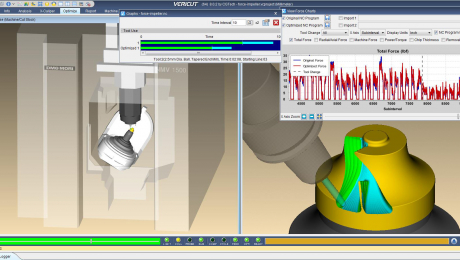
VERICUT’s Force optimises NC programs by analysing cutting conditions such as force, chip thickness, and feed rate. In this latest version, Force can display graphs and charts in real-time, revealing cutting conditions and forces as they are encountered by cutting tools. This feature allows the NC programmer to identify undesirable cutting conditions such as excessive forces, chip loads, tool deflection, or material removal rates represented as spikes in the graphs. Force Charts are dynamically linked with VERICUT’s NC Program Review, making it easy to review problem cutting conditions. With one click on the chart, the user is taken to the location in the CNC program and shown the actual cut in the graphics window. By optimising toolpath feed rates Force reduces production time, prolongs tool life, and produces a higher quality finished product.
VERICUT’s Additive module simulates both additive and traditional machining capabilities used in any order on hybrid CNC machines. Simulating both operations can identify potential problems that can occur when integrating additive methods. The user can access detailed ‘history’ stored with VERICUT’s unique droplet technology, which saves programmers time by quickly identifying the source of errors, in most cases using a single mouse-click.
It checks accurate laser cladding and material deposition, detects collisions between the machine and additive part, and finds errors, voids, and misplaced material. Users can virtually experiment with combining additive and metal removal processes to determine optimal safe hybrid manufacturing methods.
VERICUT’s new Section dialog makes it easier and faster to see inside a part during simulation. This allows the user to check proper fit, and identify interference between the workpiece and machine components. The X-Caliper measuring tool identifies model thickness, length, and width dimensions. In 8.1, measurements are shown on the part, and can be rotated with the part, zoomed, or dragged to a different location. Multiple dimensions can be displayed to quickly document key measurements with on part dimensions, and setup dimensions designed for inspection aids. Dimension images are easily referenced in VERICUT reports.
Enhanced support for Grinding and Dressing operations means users can now simulate Dressing: where a secondary tool is applied to a grinding wheel to freshen the grinding surface, or to change the grinding wheel cutting shape. VERICUT can simulate the Dynamic compensation needed while the dresser is used, even when the grinder is engaged with the part.
CGTech will exhibit its latest version of VERICUT 8.1, CNC machine simulation, verification and optimisation software at the EMO Show in Hanover, Germany, Sept. 18-23, in Hall 25, Stand D07.
VERICUT 8.1 sees enhanced support for Force™ optimisation, a new Additive Manufacturing (AM) module being employed, along with, Workpiece Sectioning, X-Caliper measurement tool, Report template, and Grinding and Dressing operations.
VERICUT’s Force optimises NC programs by analysing cutting conditions such as force, chip thickness, and feed rate. In this latest version, Force can display graphs and charts in real-time, revealing cutting conditions and forces as they are encountered by cutting tools. This feature allows the NC programmer to identify undesirable cutting conditions such as excessive forces, chip loads, tool deflection, or material removal rates represented as spikes in the graphs. Force Charts are dynamically linked with VERICUT’s NC Program Review, making it easy to review problem cutting conditions. With one click on the chart, the user is taken to the location in the CNC program and shown the actual cut in the graphics window. By optimising toolpath feed rates Force reduces production time, prolongs tool life, and produces a higher quality finished product.
VERICUT’s Additive module simulates both additive and traditional machining capabilities used in any order on hybrid CNC machines. Simulating both operations can identify potential problems that can occur when integrating additive methods. The user can access detailed ‘history’ stored with VERICUT’s unique droplet technology, which saves programmers time by quickly identifying the source of errors, in most cases using a single mouse-click.
It checks accurate laser cladding and material deposition, detects collisions between the machine and additive part, and finds errors, voids, and misplaced material. Users can virtually experiment with combining additive and metal removal processes to determine optimal safe hybrid manufacturing methods.
VERICUT’s new Section dialog makes it easier and faster to see inside a part during simulation. This allows the user to check proper fit, and identify interference between the workpiece and machine components. The X-Caliper measuring tool identifies model thickness, length, and width dimensions. In 8.1, measurements are shown on the part, and can be rotated with the part, zoomed, or dragged to a different location. Multiple dimensions can be displayed to quickly document key measurements with on part dimensions, and setup dimensions designed for inspection aids. Dimension images are easily referenced in VERICUT reports.
Enhanced support for Grinding and Dressing operations means users can now simulate Dressing: where a secondary tool is applied to a grinding wheel to freshen the grinding surface, or to change the grinding wheel cutting shape. VERICUT can simulate the Dynamic compensation needed while the dresser is used, even when the grinder is engaged with the part.