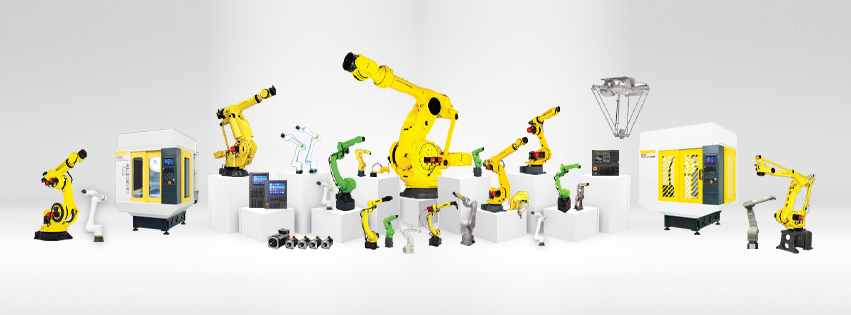

FANUC presents new FANUC SCARA SR series robot
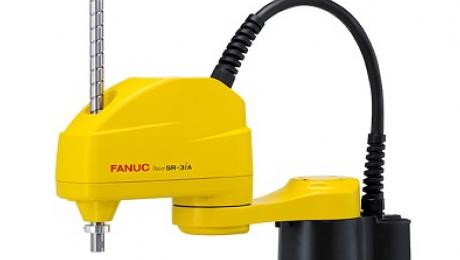
With the new SR-3iA FANUC introduces its first robot of the newly developed SCARA robot series. For the first time the new model was presented at the International Robot Exhibition (iREX) 2017 in Tokyo, Japan, which took place in November, 2017.
FANUC’s new SCARA robot features high-speed, precise operation for pick and place, assembly, testing/inspection and packaging
processes in a wide range of industries including consumer electronics, auto components, plastics, lab automation, appliances and medical device manufacturing. A compact, lightweight and clean design provides significant space savings.
The new SR-3iA robot represents FANUC’s next level of speed and precision for assembly and material handling applications. With the addition of SCARA robots to their small robot lineup, FANUC is able to provide customers with a cost-effective solution to achieve higher productivity. The SR-3iA offers a 3kg payload, 400mm reach, and 200mm stroke.
Powered by the new R-30iB Compact Plus controller, the new SCARA robot offers the same intelligence and reliability available on all FANUC robots, including integrated iRVision, iRPickTool, force sensing, conveyor tracking, fieldbus connectivity, integrated safety, and most other software options. FANUC’s new SCARA iRProgrammer software interface is easy to use for complete robot setup and programming with tablets or PCs, and can be accessed via a web browser (e.g. Safari, Chrome).
FANUC SCARA Robot Features and Benefits
- Ultra-compact footprint and slim profile minimize interference with peripheral devices
- Lightweight design enables easy system integration and continuous fast operation
- High inertia capacity maximises flexibility to handle large work pieces
- 200mm long vertical stroke makes it possible to perform assembly, packaging and handling operations
- Bottom cable exit (optional) provides cable protection, and saves valuable floor space for higher efficiency
- Integral air lines, 24VDC power and I/O signal cables, and solenoid valves (optional) simplify system integration and reduce overall cost
- Brake release switch on the robot’s arm allows easy error recovery
- New high-performance R-30iB Compact Plus controller requires minimal space and allows layout and installation flexibility
- New web-based iRProgrammer user interface for intuitive and easy robot setup and programming on a Tablet or PC (Web browser independent, Teach Pendant is optional)
- Standard CE/NRTL compliance on the R-30iB Compact Plus controller allows global deployment without any additional cost
- Same high performance intelligent software options across the entire FANUC robot line, including iRVision (Integrated Vision), iRPickTool, force sensing, conveyor tracking, fieldbus connectivity and integrated safety
With the new SR-3iA FANUC introduces its first robot of the newly developed SCARA robot series. For the first time the new model was presented at the International Robot Exhibition (iREX) 2017 in Tokyo, Japan, which took place in November, 2017.
FANUC’s new SCARA robot features high-speed, precise operation for pick and place, assembly, testing/inspection and packaging
processes in a wide range of industries including consumer electronics, auto components, plastics, lab automation, appliances and medical device manufacturing. A compact, lightweight and clean design provides significant space savings.
The new SR-3iA robot represents FANUC’s next level of speed and precision for assembly and material handling applications. With the addition of SCARA robots to their small robot lineup, FANUC is able to provide customers with a cost-effective solution to achieve higher productivity. The SR-3iA offers a 3kg payload, 400mm reach, and 200mm stroke.
Powered by the new R-30iB Compact Plus controller, the new SCARA robot offers the same intelligence and reliability available on all FANUC robots, including integrated iRVision, iRPickTool, force sensing, conveyor tracking, fieldbus connectivity, integrated safety, and most other software options. FANUC’s new SCARA iRProgrammer software interface is easy to use for complete robot setup and programming with tablets or PCs, and can be accessed via a web browser (e.g. Safari, Chrome).
FANUC SCARA Robot Features and Benefits
- Ultra-compact footprint and slim profile minimize interference with peripheral devices
- Lightweight design enables easy system integration and continuous fast operation
- High inertia capacity maximises flexibility to handle large work pieces
- 200mm long vertical stroke makes it possible to perform assembly, packaging and handling operations
- Bottom cable exit (optional) provides cable protection, and saves valuable floor space for higher efficiency
- Integral air lines, 24VDC power and I/O signal cables, and solenoid valves (optional) simplify system integration and reduce overall cost
- Brake release switch on the robot’s arm allows easy error recovery
- New high-performance R-30iB Compact Plus controller requires minimal space and allows layout and installation flexibility
- New web-based iRProgrammer user interface for intuitive and easy robot setup and programming on a Tablet or PC (Web browser independent, Teach Pendant is optional)
- Standard CE/NRTL compliance on the R-30iB Compact Plus controller allows global deployment without any additional cost
- Same high performance intelligent software options across the entire FANUC robot line, including iRVision (Integrated Vision), iRPickTool, force sensing, conveyor tracking, fieldbus connectivity and integrated safety