

The TNC7 from HEIDENHAIN: New functions and improved features for shop-floor oriented production
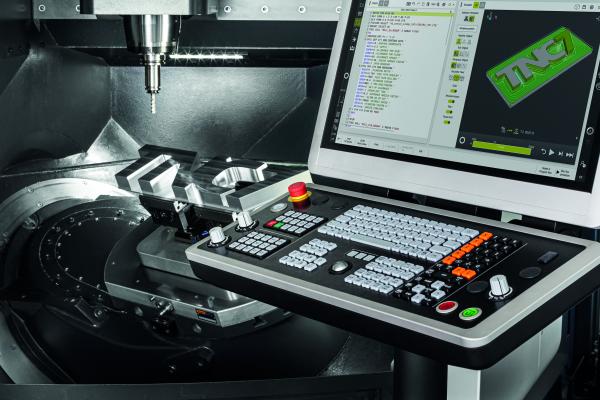
The new TNC7 control gives machine-tool users and manufacturers brand new ways to program and operate their machines. Operation is intuitive, task-focused and customizable. This is due to numerous smart functions that take shop-centered manufacturing into a new dimension. Visitors to AMB 2022 can discover the new TNC7 at the HEIDENHAIN booth and at the TNC Club booth in Hall 2, as well as at the booths of the machine manufacturers Axa, Hedlius, Hermle, Matec and Samag.
The new graphical 6D workpiece setup feature
Along with graphical setup of fixtures, the TNC7 now offers the possibility of using a probing function to very quickly and graphically set up any workpieces, including complex free-form parts. The TNC7 visualizes the machine's entire work envelope, with machine components, workholding equipment, tools and workpieces, for a simple and reliable setup process. By being able to depict the entire situation within the work envelope in 3D, the TNC7 provides the machinist with the best possible support during setup.
With the new graphical 6D workpiece setup feature, the machinist no longer needs to know which probing functions must be run in which sequence. The TNC7 provides step-by-step support during setup. First the machinist really does clamp the workpiece in the workholding equipment. Then he chooses an appropriate 3D model of this workpiece on the control and virtually positions it roughly in the fixture. At this stage already the TNC7 indicates that the touch probe has detected the workpiece. The TNC7 then uses arrows on the touchscreen's virtual display to guide the machinist through the individual probing procedures. A green arrow on the screen shows that a worthwhile probing procedure can be initiated. All that's left to do is press the NC Start key. An easily understood traffic light system shows whether the actual position of the workpiece, including any rotations, has already been recorded and so whether the preset can be saved. Machining can start once the workpiece has been completely measured.
On the one hand, this new function thus allows even less experienced operators to set up a simple workpiece quickly and reliably. On the other hand, any kinds of workpieces can now be aligned, such as complex cuboid or free-form blanks, castings, or welded and pre-milled parts. This is made possible by the ability to now move rotary axes during the probing process. The TNC7 thus opens up new possible applications.
Convenient programming using NC sequences
The new NC sequences feature of the TNC7 ensures especially convenient programming. It allows the user to save any frequently-used sequences from NC programs and simply reinsert them into new programs at any time. This could include, for example, the blocks that are necessary to tilt the working plane, or even sections covering entire functions or technology packages. So for Optimized Contour Milling (OCM), which is the next generation of trochoidal milling, the machinist can store combinations of various cycles and tools, and then call them at any time. This makes daily programming on the shop floor much quicker and easier. But even technology data, such as for thread cutting and again including tools and cycles, can also be stored as NC sequences. The machinist simply selects the desired section of an existing NC program and then saves it under any name using the "Create NC sequence" command. If processes change, the NC sequences created in this manner can be expanded or modified at any time.
Smart programming
The TNC7 enhances familiar Klartext programming with smart functions and newly developed graphical programming. The operator draws contours directly on the touchscreen. The TNC7 converts this drawing to the dialog-guided Klartext programming language. Cycles and existing contour programs can still be used, as well as existing NC programs.
The TNC7 accompanies the entire manufacturing process from initial design to the finished workpiece with thoughtfully designed solutions. These include a vast package of cycles, smart probing functions, and graphical guidance for aligning your workholding equipment. The new, high-performance editor permits fast and reliable editing even of complex NC programs. Perfect visualization of the machined part and work envelope make everyday work much easier. Programs can be simulated at any time without needing to switch the operating mode.
A customizable user interface, now featuring a Dark mode
The user interface of the TNC7 is designed so that the user quickly achieves the best possible outcome. The new Dark mode makes the TNC7 touchscreen easier to read and improves visibility, enabling users to work with their controls even under difficult lighting conditions. Since different types of tasks can be accomplished best in appropriate surroundings, users can adapt the screen contents to their respective desires, for example with individualized favorites and a Home menu for getting started quickly. That way all information and functionalities are located exactly where they are needed.
Based on fillable forms and dialog guidance, the user interface delivers optimal operating convenience and navigation. Thanks to its very fast responsiveness, the control reacts to gestures with zero delay. The result is smooth and precise touchscreen operation. The newly developed keyboard features an improved mechanical design, including an optimized key resistance, making classical keystroke entries even easier and more reliable.
Perfect design
The TNC7 defines the design of future generations of controls from HEIDENHAIN. However, a noticeably new look-and-feel is only part of the equation. Along with high-quality hardware components, the TNC7 mainly features an innovative user interface that can be customized to each user's individual needs. User interaction with the TNC7 was also redesigned from the ground up. The TNC7 supports users in every situation, whether it be programming, machine setup, or part measurement. The very extensive package of functions offers a maximum degree of flexibility in operations.
The next generation of Dynamic Collision Monitoring (DCM)
Full protection of your machine is ensured by the monitoring of machine components, tools, and workholding equipment. The TNC7 provides this by taking Dynamic Collision Monitoring (DCM) to the next generation. With this next level of CNC control, DCM not only prevents collisions between machine components and tools. It also allows workholding equipment in 3D file formats to be imported, monitored, and, thanks to a new functionality, very easily aligned with graphical support. The TNC7 offers this collision protection in both manual and automatic operation. Possible collisions are already detected during the simulation, so even before machining begins. The TNC7 depicts the situation in the work envelope, including the tool, fixtures and workpiece, in a high-resolution and realistic 3D view.
TNC Component Monitoring protects the machine tool
TNC Component Monitoring is a toolbox that allows machine manufacturers to implement extensive monitoring functions. During machining, this function can protect the spindle bearing from overloading, detect increased component wear in the drive chain, and more. It also delivers valuable data about actual loads acting on the machine, thus helping you evaluate process capability and plan maintenance within the context of predictive maintenance. The TNC Component Monitoring function can also record and display the amount of wear on the recirculating ball screw or even warn you about spindle overload.
TNC Process Monitoring for safe and reliable manufacturing
The process monitoring integrated in the TNC dependably detects disturbances in the machining process based on deviations from reference machining operations. The user can adapt this monitoring through simple Klartext syntax and an intuitive user interface. With no additional sensors required, it ensures high process quality. This provides for ready verification of process outcomes and ensures stable productivity thanks to an extensive range of reactions, such as inserting a replacement tool.
The new TNC7 control gives machine-tool users and manufacturers brand new ways to program and operate their machines. Operation is intuitive, task-focused and customizable. This is due to numerous smart functions that take shop-centered manufacturing into a new dimension. Visitors to AMB 2022 can discover the new TNC7 at the HEIDENHAIN booth and at the TNC Club booth in Hall 2, as well as at the booths of the machine manufacturers Axa, Hedlius, Hermle, Matec and Samag.
The new graphical 6D workpiece setup feature
Along with graphical setup of fixtures, the TNC7 now offers the possibility of using a probing function to very quickly and graphically set up any workpieces, including complex free-form parts. The TNC7 visualizes the machine's entire work envelope, with machine components, workholding equipment, tools and workpieces, for a simple and reliable setup process. By being able to depict the entire situation within the work envelope in 3D, the TNC7 provides the machinist with the best possible support during setup.
With the new graphical 6D workpiece setup feature, the machinist no longer needs to know which probing functions must be run in which sequence. The TNC7 provides step-by-step support during setup. First the machinist really does clamp the workpiece in the workholding equipment. Then he chooses an appropriate 3D model of this workpiece on the control and virtually positions it roughly in the fixture. At this stage already the TNC7 indicates that the touch probe has detected the workpiece. The TNC7 then uses arrows on the touchscreen's virtual display to guide the machinist through the individual probing procedures. A green arrow on the screen shows that a worthwhile probing procedure can be initiated. All that's left to do is press the NC Start key. An easily understood traffic light system shows whether the actual position of the workpiece, including any rotations, has already been recorded and so whether the preset can be saved. Machining can start once the workpiece has been completely measured.
On the one hand, this new function thus allows even less experienced operators to set up a simple workpiece quickly and reliably. On the other hand, any kinds of workpieces can now be aligned, such as complex cuboid or free-form blanks, castings, or welded and pre-milled parts. This is made possible by the ability to now move rotary axes during the probing process. The TNC7 thus opens up new possible applications.
Convenient programming using NC sequences
The new NC sequences feature of the TNC7 ensures especially convenient programming. It allows the user to save any frequently-used sequences from NC programs and simply reinsert them into new programs at any time. This could include, for example, the blocks that are necessary to tilt the working plane, or even sections covering entire functions or technology packages. So for Optimized Contour Milling (OCM), which is the next generation of trochoidal milling, the machinist can store combinations of various cycles and tools, and then call them at any time. This makes daily programming on the shop floor much quicker and easier. But even technology data, such as for thread cutting and again including tools and cycles, can also be stored as NC sequences. The machinist simply selects the desired section of an existing NC program and then saves it under any name using the "Create NC sequence" command. If processes change, the NC sequences created in this manner can be expanded or modified at any time.
Smart programming
The TNC7 enhances familiar Klartext programming with smart functions and newly developed graphical programming. The operator draws contours directly on the touchscreen. The TNC7 converts this drawing to the dialog-guided Klartext programming language. Cycles and existing contour programs can still be used, as well as existing NC programs.
The TNC7 accompanies the entire manufacturing process from initial design to the finished workpiece with thoughtfully designed solutions. These include a vast package of cycles, smart probing functions, and graphical guidance for aligning your workholding equipment. The new, high-performance editor permits fast and reliable editing even of complex NC programs. Perfect visualization of the machined part and work envelope make everyday work much easier. Programs can be simulated at any time without needing to switch the operating mode.
A customizable user interface, now featuring a Dark mode
The user interface of the TNC7 is designed so that the user quickly achieves the best possible outcome. The new Dark mode makes the TNC7 touchscreen easier to read and improves visibility, enabling users to work with their controls even under difficult lighting conditions. Since different types of tasks can be accomplished best in appropriate surroundings, users can adapt the screen contents to their respective desires, for example with individualized favorites and a Home menu for getting started quickly. That way all information and functionalities are located exactly where they are needed.
Based on fillable forms and dialog guidance, the user interface delivers optimal operating convenience and navigation. Thanks to its very fast responsiveness, the control reacts to gestures with zero delay. The result is smooth and precise touchscreen operation. The newly developed keyboard features an improved mechanical design, including an optimized key resistance, making classical keystroke entries even easier and more reliable.
Perfect design
The TNC7 defines the design of future generations of controls from HEIDENHAIN. However, a noticeably new look-and-feel is only part of the equation. Along with high-quality hardware components, the TNC7 mainly features an innovative user interface that can be customized to each user's individual needs. User interaction with the TNC7 was also redesigned from the ground up. The TNC7 supports users in every situation, whether it be programming, machine setup, or part measurement. The very extensive package of functions offers a maximum degree of flexibility in operations.
The next generation of Dynamic Collision Monitoring (DCM)
Full protection of your machine is ensured by the monitoring of machine components, tools, and workholding equipment. The TNC7 provides this by taking Dynamic Collision Monitoring (DCM) to the next generation. With this next level of CNC control, DCM not only prevents collisions between machine components and tools. It also allows workholding equipment in 3D file formats to be imported, monitored, and, thanks to a new functionality, very easily aligned with graphical support. The TNC7 offers this collision protection in both manual and automatic operation. Possible collisions are already detected during the simulation, so even before machining begins. The TNC7 depicts the situation in the work envelope, including the tool, fixtures and workpiece, in a high-resolution and realistic 3D view.
TNC Component Monitoring protects the machine tool
TNC Component Monitoring is a toolbox that allows machine manufacturers to implement extensive monitoring functions. During machining, this function can protect the spindle bearing from overloading, detect increased component wear in the drive chain, and more. It also delivers valuable data about actual loads acting on the machine, thus helping you evaluate process capability and plan maintenance within the context of predictive maintenance. The TNC Component Monitoring function can also record and display the amount of wear on the recirculating ball screw or even warn you about spindle overload.
TNC Process Monitoring for safe and reliable manufacturing
The process monitoring integrated in the TNC dependably detects disturbances in the machining process based on deviations from reference machining operations. The user can adapt this monitoring through simple Klartext syntax and an intuitive user interface. With no additional sensors required, it ensures high process quality. This provides for ready verification of process outcomes and ensures stable productivity thanks to an extensive range of reactions, such as inserting a replacement tool.